Showing posts with label cyber_threats. Show all posts

What is Piggybacking ?

1 comments

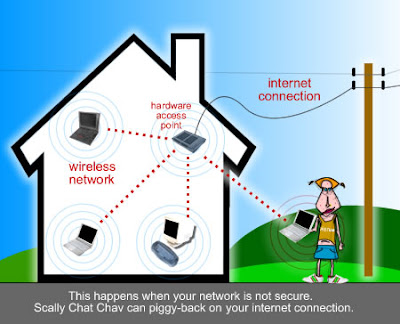
Piggybacking refers to gaining access to a wireless Internet connection by bringing your laptop computer within the range of another’s wireless connection, and using that service without the subscriber’s explicit permission.

Check below scenario – you live in a multi storied building and your apartment is in the 3rd floor. Someone from the 2nd floor always connects to your wireless network and browses the web, downloads files and you have to pay for the extra usage bills.


Basic mechanism of Piggybacking

More Info Abt Piggybacking_IA [ Internet Access]

http://en.wikipedia.org/wiki/Piggybacking_%28Internet_access%29

Free Virus with Free AntiVirus

0 comments

Rogue AV programs have become increasingly common in last two years. There are couple of things interesting about rogue AV programs. First, the bad guys here do not use (in most cases) any sophisticated attacks on clients. They instead rely on visitors to wittingly install their "AV program". How do they do this? Through social engineering – they create web pages which are very authentic copy of legitimate screens in Windows operating systems. These web pages make visitors believe that their machine is infected with several malicious programs and that the offered "AV program" can help them clean it.
Once the rogue AV program is installed, the victim has to pay money to get it "working" or, in some cases to even uninstall it. So, the money making scheme is simple (some rogue AV versions even steal local data and install keyloggers).

In order to get people to visit their web sites serving rogue AV programs, the attackers use different vectors-
They Spend a huge ammount on Advertisement like Google Adwords, which make them always on a top of google search list. The victims who trust google usually fall in such pranks and download these malwares.
The main reason, however, why rogue AV is so successful is its persistence and amount of details - the web page they use to scare the visitor looks almost exactly like Windows' Security Center. One such page is shown below:
I was, of course, interested to see what else they do so I decided to analyze the code behind. First of all, I must say that the code is very elegant and clean, it's obvious that the bad guys got a real programmer to code the page (and malware?) for them.
The web page uses JQuery, a well known and popular JavaScript library. After setting up the environment, the JavaScript code on the web page shows a fake scan of the machine with seemingly random file names. The file names are actually grabbed from a huge array contained in a separate file (flist.js). The file names in this array (there is 1100 of them) are actually copied from a Windows XP machine (C:WindowsSystem32 directory). This, of course, increases the authenticity of the scan.
After the scan finishes, the user is informed that the machine is infected with viruses. The JavaScript code on the web page initially set up some handlers, so no matter what the user does next he will see a window notifying him that his machine is infected (interesting, the attackers used JavaScript confirm() method to display this message).
Of course, this wasn't generated by Windows – it's actually just an image the attackers created. The "Remove all" and "Cancel" also aren't real buttons, just part of the image which has a handler that will get executed wherever the user clicks. You guess, on a click it will try to download the Rogue AV program. To eliminate any confusion, they also show this nice window where they explain what exactly needs to be done in order to install their rogue AV program.

It is now not strange that rogue AV programs are infecting so many machines. The devil is in the details, and the attackers made damn sure that all details are here to fool the potential victims

Dont Press F1 - Your System could get HACKED

0 comments

Microsoft told Windows XP users today not to press the F1 key when prompted by a Web site, as part of its reaction to an unpatched vulnerability that hackers could exploit to hijack PCs running Internet Explorer (IE).
In a security advisory issued late Monday, Microsoft confirmed the unpatched bug in VBScript that Polish researcher Maurycy Prodeus had revealed Friday, offered more information on the flaw and provided some advice on how to protect PCs until a patch shipped.
"The vulnerability exists in the way that VBScript interacts with Windows Help files when using Internet Explorer," read the advisory. "If a malicious Web site displayed a specially crafted dialog box and a user pressed the F1 key, arbitrary code could be executed in the security context of the currently logged-on user."
Last week, Prodeus called the bug a "logic flaw," and said attackers could exploit it by feeding users malicious code disguised as a Windows help file -- such files have a ".hlp" extension -- then convincing them to press the F1 key when a pop-up appeared. He rated the vulnerability as "medium" because of the required user interaction.
Windows 2000, Windows XP and Windows Server 2003 are impacted by the bug, said Microsoft, and any supported versions of Internet Explorer (IE) on those operating systems -- including IE6 on Windows XP -- could be leveraged by attackers. Previously, Prodeus had said that users running IE7 and IE8 were at risk, but had not called out IE6.
Until a patch is ready, users can protect themselves by not pressing the F1 key if a Web site tells them to, said Microsoft.
"As an interim workaround, users are advised to avoid pressing F1 on dialogs presented from Web pages or other Internet content," said David Ross with the Microsoft Security Response Center (MSRC) engineering staff in a blog entry on Monday.
"The prompt can appear repeatedly when dismissed, nagging the user to press the F1 key," Ross added.
The security advisory made the same recommendation: "Our analysis shows that if users do not press the F1 key on their keyboard, the vulnerability cannot be exploited."
Users can also stymie attacks by disabling Windows Help. The advisory explained how to entering a one-line command at a Windows command-line prompt to lock down the Help system.
The company took Prodeus to task for taking the bug public, something it regularly does when researchers disclose a vulnerability or post sample attack code before a patch is available.
"Microsoft is concerned that this vulnerability was not responsibly disclosed, potentially putting customers at risk," said Jerry Bryant, a senior manager with the MSRC, in an e-mail. By Prodeus' account, he notified Microsoft of the flaw Feb. 1, about four weeks before publishing his findings.
Microsoft has not set a timeline for a fix, saying only that, "Microsoft will take the appropriate action to help protect our customers." The next scheduled security patch date for the company is March 9.
Although it does not rate the severity of vulnerabilities in its advisories, Microsoft noted that hackers exploiting the VBScript flaw using Windows Help and Internet Explorer could grab complete control of a Windows system.
Customers running Windows Vista, Windows Server 2008, Windows 7 or Windows Server 2008 R2 are safe from such attacks, Microsoft said

Downloading a “Movie” or a “Microbe”?

0 comments

With the popularity of portable electronic devices, computers, and internet, nobody wants to carry around a bulky pack of CD's or DVD's anymore. There are several file sharing programs out on the internet that allow you to download movies and various other kind of stuff free of cost. But here a question arises as to why these providers are uploading these media for free? A survey by Anti Hacking Anticipation Society produces some facts that these movies contain hidden viruses and Trojans that get installed on your system when you try to open/play them and then spy on you or harm you in other ways. These Microbes download other malicious applications at the backend that make a computer no more useful for his master. The only preferred solution thereafter is just to compromise with these malice or format the entire system to get rid of them.

How these Microbes work?

Traditionally, most of the internet users download movies and movies using file sharing portals but now scenario is changed there are now n number of options for techno savvies to get a newly released movie. Without knowing the fact that nothing is free in world, these people download movies from torrents. Where, providers have self interest in sharing the files. They bind malicious scripts with movies such that while playing such movie, automatically a Microbe gets executed. These microbes keep a watch on your surfing habits, maintain a log of websites visited and email addresses typed and send you bulk spam emails. Even these logs are automatically forwarded to interested people who sell this information further to spammers.
Next time when you download and play a movie in a player (eg. VLC) you might see a error message "trying to play hd file aborting redirecting to site", please don't continue with that movie, as this error message signifies that it is taking you to an another host not even if it asks you to download "full codec player" to play the movie.


There Microbes and viruses have been considered to be a threat since the advent of the PC. The situation is critical now because 9 out of every 10 pc's connected via the internet is infected with Microbes and viruses.

Java Drive : The Next Generation of Threats

0 comments


Nothing is 100% safe, Not even a simple pop-up window on which you click Yes without giving it a second thought. Ask yourself, Did you ever care to think , every time you clicked on a pop-up(like the one shown below) that you were playing in to the hands of a malicious attacker.


From now onwards, look at it once more to check whether it is malicious or not.

"Drive-by download" is basically the “download of any malicious/unwanted content on a computer without the knowledge of the user”

It's a fake webclient or you may call it a fake certificate, whose sole purpose is to take control of your system. It may be through the installation of Keyloggers,viruses or trojans.

In terms of programming, it’s a simple Java applet.
If you’re a good programmer, you could make one of those yourself.

Now, in the case of common users, they won't think of the pop-up as anything but a tool required to see a flash video or view a webcam, or even a simple HTML page. Thats why this attack is so much widespread and successful.

This type of attack is by far the simplest to pull and does not rely on any particular kind of vulnerability. The Java Runtime is the only browser-embeddable object which gives such a degree of access from simple Web pages. Flash, Adobe Reader, and even Signed JavaScript (disabled by default) wont allow you to do all of these, mainly because it is highly insecure!

If you have never seen anything like this, it is a warning shown when the security certificate is crypted.

This does'nt mean that the Java platform, in particular, is vulnerable and that we should avoid all objects online using java. Infact it is an awesome platform for web apps. The main thing here is the human factor which is highly exploitable.

The aim here is to just expose the widely used hacking methods online.
Use a good antivirus. Keep updating your browsers. Don’t run Active-X content unless you’re sure what it is.

It is just like a hidden pop-up box saying,

“Do you wanna give the whole access to the attacker”

And you click YES!!

So, before you click, think twice!!